
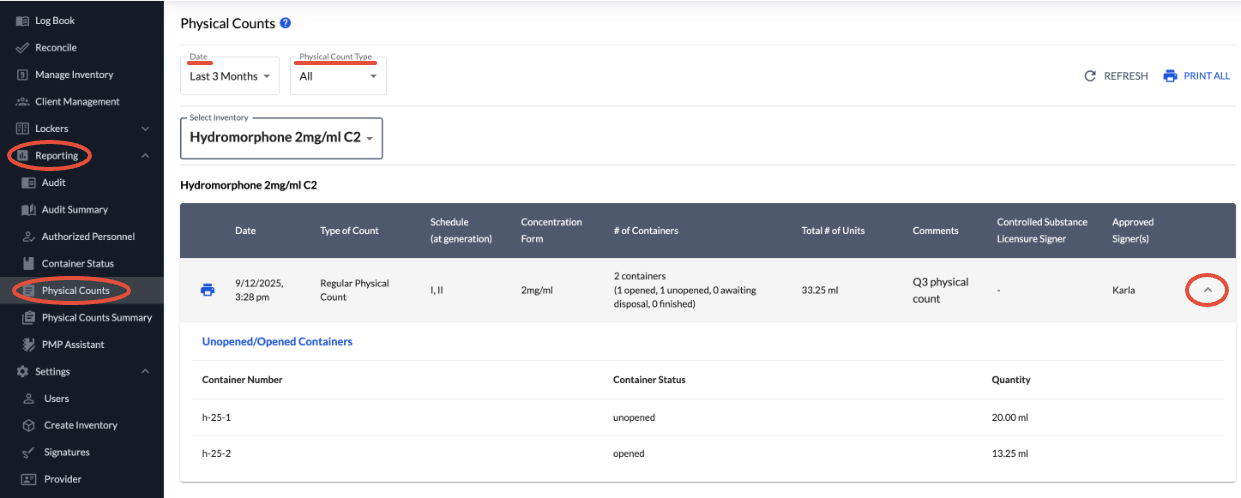
You can access Physical Counts recorded in the Reporting section.
In this view, you'll find a summary of each physical count, with options to:
Filter by Biennial Counts, Regular Physical Counts, or All
Select default date ranges or set a custom date range
Click the arrow on the far right of any entry to view detailed container-level information
If you see a Missing Information button, it likely indicates that a Biennial Count was created before DEA DVM information became a required field. You can update this information directly within this screen.
Privileged and confidential. For VetSnap and LogButler approved use only. Copyright © VetSnap Corporation and LogButler. All rights reserved. Not to be distributed, reproduced, modified, or used to create derivative works without explicit written permission from VetSnap Corporation or LogButler. VetSnap and LogButler are not DEA consultants and do not provide legal or regulatory advice regarding controlled substances.