
An admin can deactivate a signature instead of permanently deleting it. Deactivating a signature allows you to reactivate it later if needed.
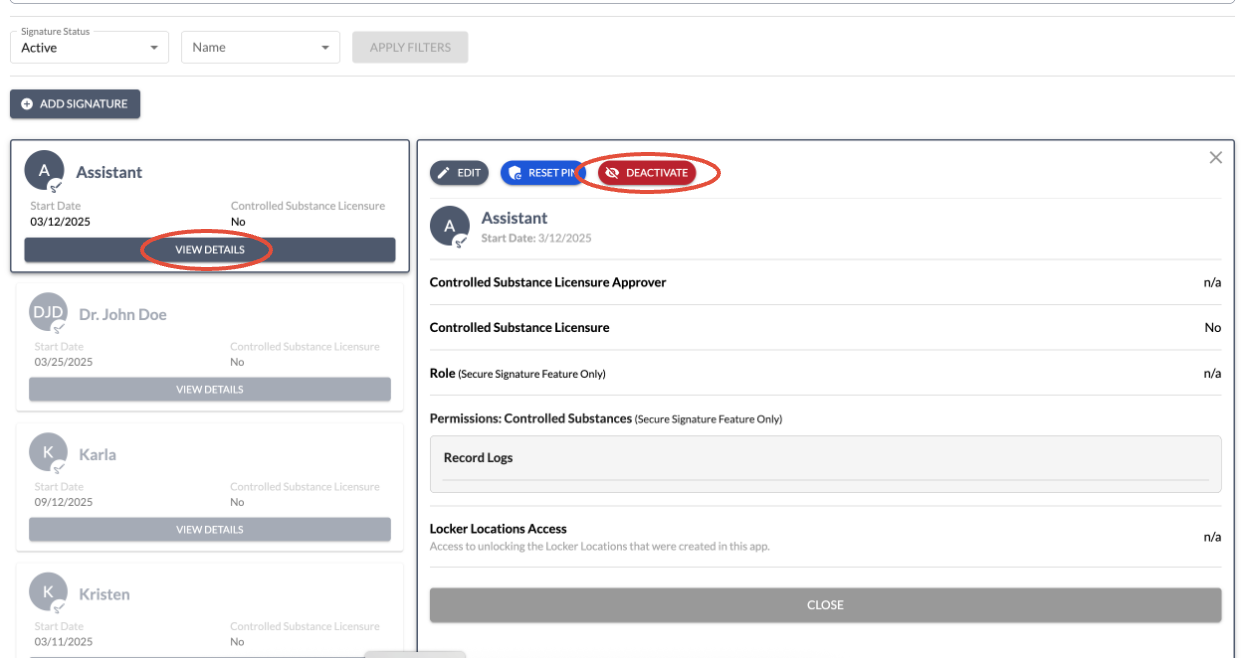
- Go to Signatures under Settings
- You will need to click View Details on the person's signature
- Then select Deactivate Signature
- You must have the Signatures permission enabled within your User account in order to deactivate the signature.
- Note: If this person were to return, you can reactivate the signature. Even once deactivated, the same name cannot be used again for a signature; it must have a variation (for example: a middle initial added or "John Smith 2"
This feature is useful for temporarily removing access, such as when an individual is on leave for an unknown amount of time.
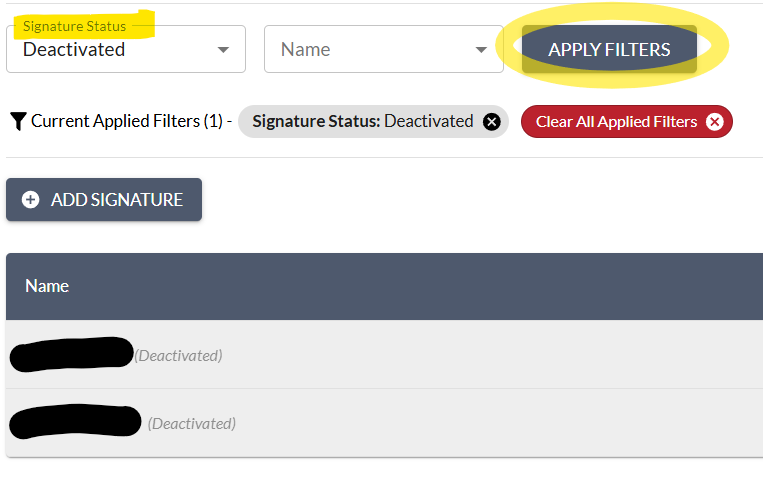
- A filter is available to help you view active and inactive signatures. When viewing deactivated signatures, you can click on them to see the option to Deactivated.
Privileged and confidential. For VetSnap and LogButler approved use only. Copyright © VetSnap Corporation and LogButler. All rights reserved. Not to be distributed, reproduced, modified, or used to create derivative works without explicit written permission from VetSnap Corporation or LogButler. VetSnap and LogButler are not DEA consultants and do not provide legal or regulatory advice regarding controlled substances.